10 Creating Professional Websites with Quarto
A website is a collection of documents that readers can navigate as a coherent resource. A faculty member might maintain a research profile, a course instructor might publish weekly lessons, and a textbook author might maintain a catalog of books. In each case the challenge is not merely to make pages attractive. The site must remain accurate, navigable, accessible, and maintainable as its content grows.
Quarto separates the source documents from the generated website. Authors write Markdown and configuration files, optionally execute computational code, and render HTML for distribution. This separation makes it possible to revise a lesson without manually editing HTML or copying numerical results between applications.
10.1 Learning objectives
After completing this chapter, you should be able to configure a website, plan navigation, construct an academic profile and course resource, create a listing of posts, customize visual presentation, integrate computational pages, and audit a site before publication.
10.2 Planning the information architecture
Begin with readers and their tasks. A prospective collaborator needs a research overview and publication links; a student needs the current lesson and assignment instructions; a textbook reader needs a reliable route to the correct edition. These tasks are more important than the choice of theme. Sketch the pages and links before creating files. A small site might use Home, Research, Teaching, Books, and Research Notes as its main destinations. A course with twelve modules needs a second level of navigation rather than twelve unrelated top-level menu entries.
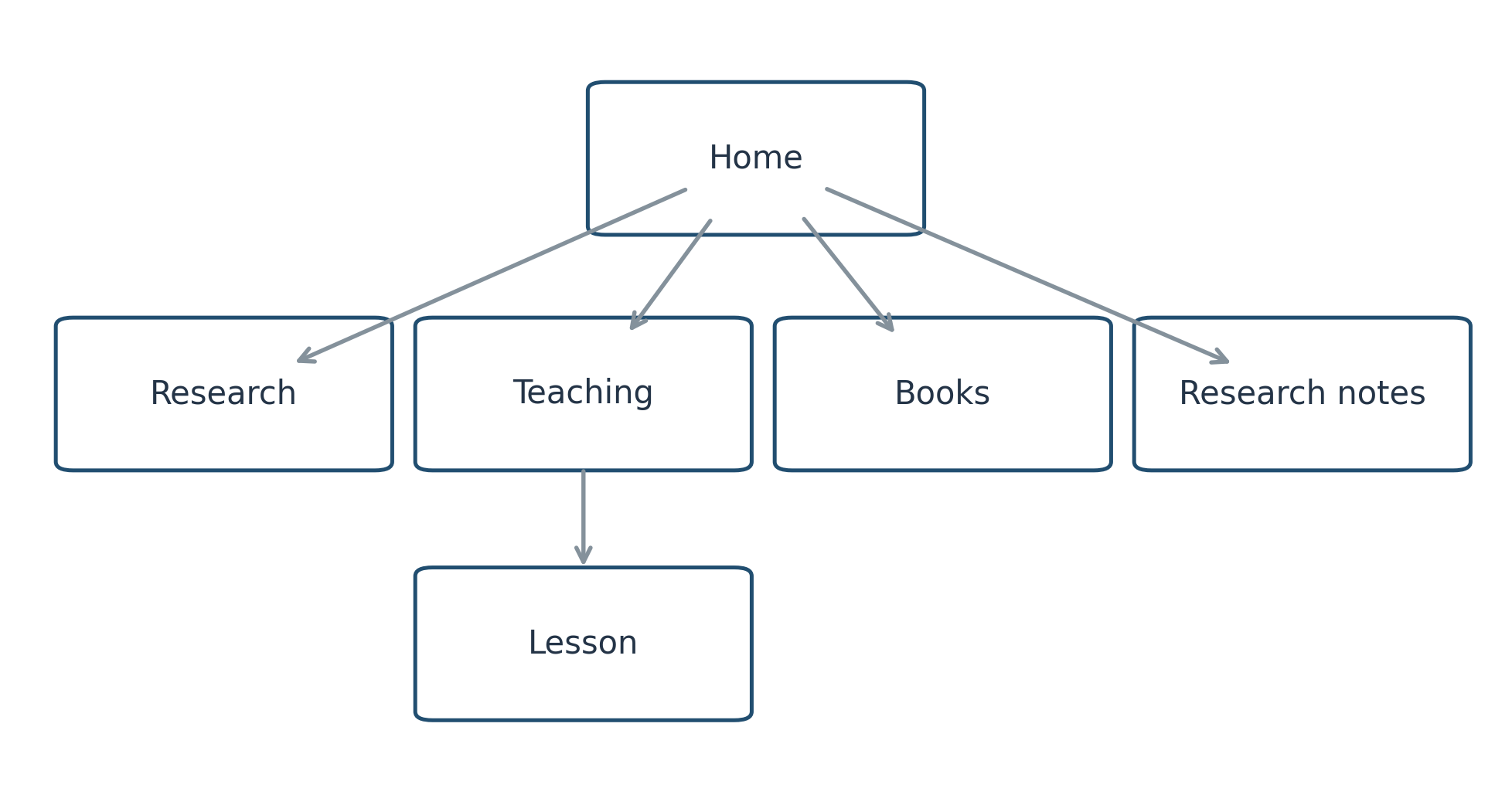
Distinguish stable pages from dated posts. A research interests page is revised in place, whereas a dated note documents a particular event or idea. A book catalog should distinguish published titles from works in development. Do not use fabricated publication links or represent an instructional demonstration as an official university site.
10.3 Creating a first website
In a terminal, run quarto create project website academic-site, or create a website project through your editor. Open the resulting directory. The configuration belongs in _quarto.yml; the home page is normally index.qmd. The output directory is generated, not the primary editing location.
project:
  type: website
  output-dir: _site
website:
  title: "Applied Quantitative Learning"
  navbar:
    left:
      - href: index.qmd
        text: Home
      - research.qmd
      - teaching.qmd
format:
  html:
    theme: cosmo
    toc: true
Create each referenced file. A page needs a title and useful content. For example, research.qmd might begin with YAML containing title: Research, followed by a heading and a concise description of current research. A link such as [Teaching](teaching.qmd) points to another source page; Quarto resolves it to the generated HTML page. Relative links are preferable for internal resources because they remain portable when the site moves to a different host or subdirectory.
From the website directory, run quarto preview to inspect the site locally. Run quarto render to build the output. Preview is a development service, not a public hosting arrangement. The generated _site directory contains the files a static host serves. Editing a generated HTML file is usually wasted effort: the next render can replace it.
The example website is a separate project inside examples/ch10/academic-site/. Open a terminal in that directory before rendering. Do not replace the textbook’s book configuration with the website configuration.
10.5 Building an academic profile
A useful home page introduces the site’s purpose, identifies its intended audience, and directs visitors to the most important content. A research page can group publications by topic or year, with DOI links and accurate author information. A teaching page can identify courses, learning objectives, and publicly shareable resources. A contact page should disclose only information the owner intends to make public.
A faculty site should not publish private student records, restricted course materials, unpublished reviewer correspondence, or identifiable patient information. Removing a link is not sufficient to remove a file from a public host. Review the entire output directory before deployment. Even synthetic data should be labeled clearly to prevent readers from interpreting an instructional example as a real clinical finding.
A publication list can initially be maintained manually. For a larger collection, use structured metadata or a listing. A DOI is a persistent identifier, not a guarantee that a reader has access to the full article. Provide an authorized open version when one exists, and avoid distributing copyrighted publisher PDFs without permission.
10.6 Course websites and computational lessons
A course site benefits from predictable structure. Each lesson can begin with objectives, introduce a problem, present a worked example, and end with practice. A consistent sequence reduces the time students spend locating materials. Distinguish public instructional materials from assessment answers and private grades. An unlinked page in a public static site is not access-controlled.
Consider five synthetic clinic waiting times: 10, 12, 15, 18, and 25 minutes. The mean is 16 minutes and the median is 15 minutes. A lesson can ask students to replace 25 with 50 and compare the resulting statistics. The new mean is 21 minutes, but the median remains 15. This illustrates sensitivity to extreme observations without requiring a complicated statistical model.
10.6.1 R implementation
```{r}
wait <- c(10, 12, 15, 18, 25)
mean(wait)
median(wait)
plot(seq_along(wait), wait, pch = 19,
     xlab = "Appointment", ylab = "Minutes")
```
10.6.2 Python implementation
```{python}
from statistics import mean, median
import matplotlib.pyplot as plt
wait = [10, 12, 15, 18, 25]
print(mean(wait), median(wait))
plt.scatter(range(1, 6), wait)
plt.xlabel("Appointment")
plt.ylabel("Minutes")
plt.show()
```
The two examples are separate computational documents in the accompanying materials. The static website lesson does not require R or Python. To integrate an executable lesson, copy one example into the website root, add it to the sidebar and render it with the appropriate engine installed. The computation occurs at build time; a reader visiting the generated HTML does not need Python or R. Interactive server-side applications are a different architecture and require additional infrastructure.
10.7 Catalogs and research notes
A catalog is a useful gateway to independently published books. Store the title, edition, status, description and verified destination for each book. Keep each book as its own Quarto book project when it needs independent chapter numbering and PDF or EPUB output. The website can link to those books without combining all their source files into one project. When a book is not yet published, display its status without a misleading download button.
For dated content, create a listing page:
---
title: Research notes
listing:
  contents: posts
  type: default
  sort: "date desc"
---
Place each post in its own folder, such as posts/welcome/index.qmd, with title, date and categories in its YAML. A listing updates when the project is rendered. This is more maintainable than manually updating a list of every post. Check dates, category spelling and summaries before publication. A listing is not a substitute for an editorial review.
10.8 Themes, typography and responsive design
A theme establishes the overall visual language. CSS can refine line spacing, focus indicators and image behavior. Prefer a restrained palette and readable body text to decorative complexity. Use the built-in light and dark theme mapping when offering both modes:
format:
  html:
    theme:
      light: cosmo
      dark: darkly
    css: styles.css
A stylesheet might contain:
#quarto-document-content { line-height: 1.65; }
img { max-width: 100%; height: auto; }
a:focus-visible { outline: 3px solid currentColor; }
Do not force black text on a dark background or remove keyboard focus outlines. Test both modes. A responsive page adapts to the viewport rather than relying on fixed pixel widths. Large statistical tables may need horizontal scrolling; a smaller table with meaningful columns is often better than shrinking text until it is unreadable. Images need descriptive alternative text, and charts should not rely on color alone. Captions describe context; alternative text communicates the relevant visual information to readers who cannot see the image.
10.9 Search, metadata and publication readiness
Enable site search using website: search: true in the appropriate nested YAML structure. Search helps readers locate content across pages, but it cannot compensate for unclear navigation. Search the rendered site for a distinctive term from a lesson and check that the result opens the correct page. Search results can expose material that is not linked in navigation, so never treat hidden navigation as privacy protection.
Set website.site-url only when the final public address is known. Social metadata can improve link previews, but preview behavior varies across platforms. Avoid adding analytics without considering institutional policies and privacy requirements. A public site should identify its ownership and distinguish personal academic content from official institutional communications.
Before deployment, build the site from source in a clean environment. Inspect the generated directory, test internal links, check external links, inspect mobile and desktop layouts, and verify keyboard navigation. Check that downloadable files are intentional. Keep source code and dependency information under version control, but exclude secrets and private data. Chapter 15 addresses hosting and deployment in detail.
10.10 Guided practice
Activity 1 — Information architecture. Sketch a five-page academic website. Identify two reader tasks for each major destination and justify the navigation labels.
Activity 2 — Local website. Copy the example project, change its title, add a contact page with fictional contact details, and update the navbar. Render and inspect every link.
Activity 3 — Computational lesson. Add either the R or Python waiting-time lesson. Change the final observation to 50, render again, and explain why the mean changes but the median does not.
Activity 4 — Accessibility audit. Inspect the site at a narrow viewport, navigate using only the keyboard, switch themes, and record three improvements. Verify that every meaningful image has appropriate alternative text.
10.11 Troubleshooting
| Symptom | Likely cause | Diagnostic action |
|---|---|---|
| Page absent from menu | Missing navigation entry | Check _quarto.yml and source filename |
| Wrong project rendered | Terminal in book root | Change to the website directory |
| Styles not applied | Incorrect CSS path | Inspect file location and rebuild |
| Code fails | Missing engine or package | Run quarto check and test the code separately |
| Broken internal link | Renamed source file | Update the relative link and render |
| Search misses new page | Stale build | Render the entire site again |
| Private file appears publicly | Output contains unintended resource | Remove it from source and host; review access and history |
10.12 Designing a site around reader journeys
A useful design specification describes tasks rather than merely pages. Imagine a student who has missed a lecture and has ten minutes to find the relevant worked example. The student should not need to understand the author’s research organization or the underlying directory structure. A visitor arriving from a search engine may enter a lesson directly, rather than through the home page. Every important page should therefore provide enough context to identify the collection to which it belongs and a route back to its parent resource.
Develop a small acceptance matrix before writing content. For each audience, specify an entry page, a destination, and a successful outcome. Test these journeys with someone who did not design the site. Asking whether the website looks good is less informative than asking a reader to find a particular resource without assistance. Record where the reader hesitates, follows an incorrect link, or encounters a page that does not explain its purpose.
| Audience | Task | Acceptance evidence |
|---|---|---|
| Student | Find the waiting-time lesson | Lesson opens from Teaching and identifies prerequisites |
| Research collaborator | Locate research methods | Research page distinguishes current work from published findings |
| Textbook reader | Find the available edition | Catalog identifies edition, status and destination |
| Instructor | Reproduce a demonstration | Source and instructions identify dependencies and data |
A navigation hierarchy is not necessarily identical to the folder hierarchy. The folder structure serves authors and build tools; navigation serves readers. A course may store all lessons in a single directory while presenting them in several thematic groups. Conversely, two independently maintained books may appear next to one another in a catalog even though their source repositories are completely separate.
10.13 Designing a multi-book academic publishing platform
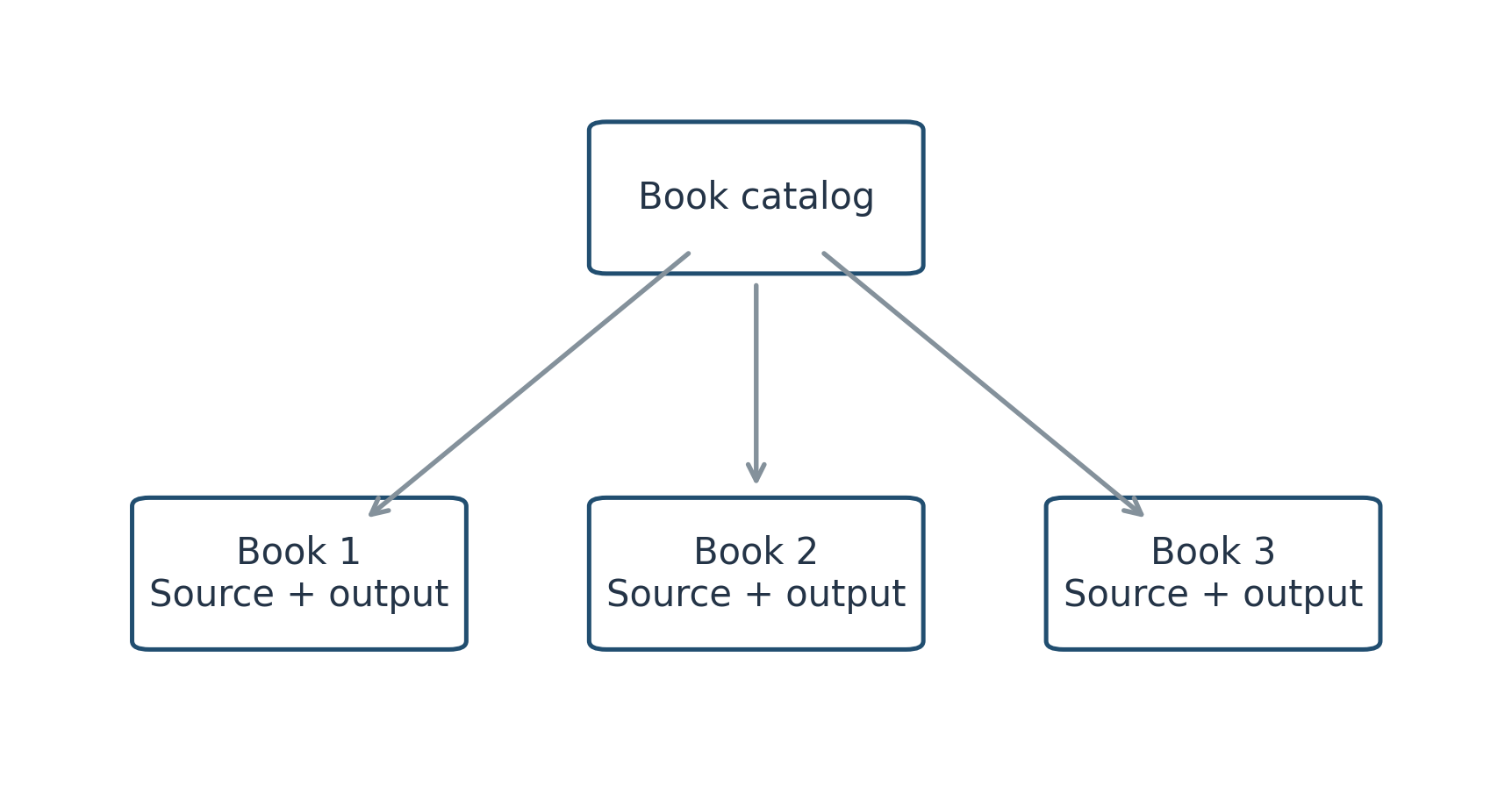
An author developing several textbooks faces a different maintenance problem from an author developing a single book. Each title may have its own release schedule, computational dependencies, chapter numbering, bibliography, and downloadable formats. Combining all source files into one book project can create unnecessary coupling. A central catalog with independent book projects is often a more manageable initial architecture.
The catalog is a website, not a book. Its purpose is discovery: it describes titles, identifies intended readers, and links to available editions. Each book remains a Quarto book project with its own configuration. For example, Book 1 might require R and Python while Book 2 might contain mostly nonexecuting code examples. A change in Book 1 dependencies need not force a rebuild of Book 2.
10.13.1 Choosing a URL strategy
Three common strategies are separate hostnames, a directory-based deployment, and a proxy that maps a public path to a separately hosted origin. Separate hostnames are usually easiest to diagnose because each book has an unambiguous origin. Directory deployment can provide a unified address but requires a coordinated output assembly process. A reverse proxy can preserve independent deployments while exposing a common public hostname, but introduces routing, redirect, caching and asset-resolution concerns. Chapter 15 develops deployment procedures in greater detail.
Use the following hypothetical paths to reason about portability. They are examples, not live publication addresses.
| Strategy | Example public location | Maintenance implication |
|---|---|---|
| Separate hostname | book-1.example.org/ |
Independent hosting and DNS configuration |
| Directory | books.example.org/book-1/ |
Assemble outputs under distinct prefixes |
| Proxy | books.example.org/book-1/ |
Route requests to the correct independent origin |
A browser resolves figures/model.png relative to the current document URL, whereas /figures/model.png starts at the hostname root. On a page at /book-1/chapter1.html, the first resolves to /book-1/figures/model.png and the second to /figures/model.png. This difference explains why a book can work at its original hostname but lose images or styles when mounted under a path. Do not assume that changing the navigation menu will repair generated asset paths. Inspect the actual network requests and generated HTML.
A trailing slash also matters. A relative link from /book-1/ resolves inside that directory, whereas a relative link from /book-1 may resolve at the parent directory. A directory-style public route should have a consistent canonical form. A proxy must also account for upstream redirects; forwarding an absolute redirect unchanged may send a reader away from the public portal. Do not deploy an unrestricted proxy that accepts arbitrary upstream addresses. Restrict destinations to explicitly approved origins and review the hosting platform’s security guidance.
10.13.2 A structured book catalog
Maintain one record per title. A useful minimal record includes a stable slug, title, edition, publication status, and public URL when available. A slug is an identifier, not a title: changing punctuation in a book title should not automatically change its slug. A draft record can be displayed without a reading link. A published record should have a verified destination. Do not invent URLs for forthcoming titles or use an empty link that sends readers to the current page.
The extended laboratory includes a JSON catalog and a Python generator that creates a Quarto page. This separates editorial metadata from display markup. The generator rejects duplicate slugs, unknown statuses, and published records without a local target. For this exercise, destinations are restricted to simple local QMD filenames; a production catalog linking external books would require a separate URL policy and verification of actual public destinations.
10.14 Building a computational lesson for public readers
A static site can contain the output of a sophisticated statistical analysis without requiring every reader to install Python or R. The computation runs during the build, and the resulting table or figure is distributed as HTML or an image. This differs from a server-backed application that computes a new result in response to a reader’s input. Browser-based JavaScript is a third possibility: simple calculations can run locally after the page loads. The appropriate choice depends on the computational complexity, privacy constraints, and educational purpose.
Consider the waiting-time lesson from earlier in this chapter. The five observations are 10, 12, 15, 18 and 25 minutes. If the last observation is replaced by a hypothetical value \(x\), then the mean becomes
\[ \bar{w}(x)=\frac{55+x}{5}. \qquad \tag{10.1}\]
For \(x\geq18\), the ordered middle observation remains 15. The derivative of the mean with respect to \(x\) is \(1/5\), so each additional five minutes in the final observation increases the mean by one minute. This is a mathematical explanation of sensitivity, not just a numerical demonstration. If \(x\) falls below 18, the median must be reconsidered using the ordered observations; it is not constant over every possible input.
| Last observation | Mean | Median |
|---|---|---|
| 18 | 14.6 | 15 |
| 25 | 16.0 | 15 |
| 50 | 21.0 | 15 |
| 75 | 26.0 | 15 |
10.14.1 R implementation
x <- seq(18, 75)
means <- (55 + x)/5
medians <- sapply(x, function(z) median(c(10,12,15,18,z)))
plot(x, means, type="l", xlab="Last waiting time (minutes)",
     ylab="Summary (minutes)", ylim=range(c(means, medians)))
lines(x, medians, lty=2)
legend("topleft", c("Mean", "Median"), lty=c(1,2), bty="n")
10.14.2 Python implementation
import numpy as np
import matplotlib.pyplot as plt
x = np.arange(18, 76)
means = (55 + x)/5
medians = [np.median([10,12,15,18,z]) for z in x]
plt.plot(x, means, label="Mean")
plt.plot(x, medians, "--", label="Median")
plt.xlabel("Last waiting time (minutes)")
plt.ylabel("Summary (minutes)")
plt.legend(frameon=False)
plt.show()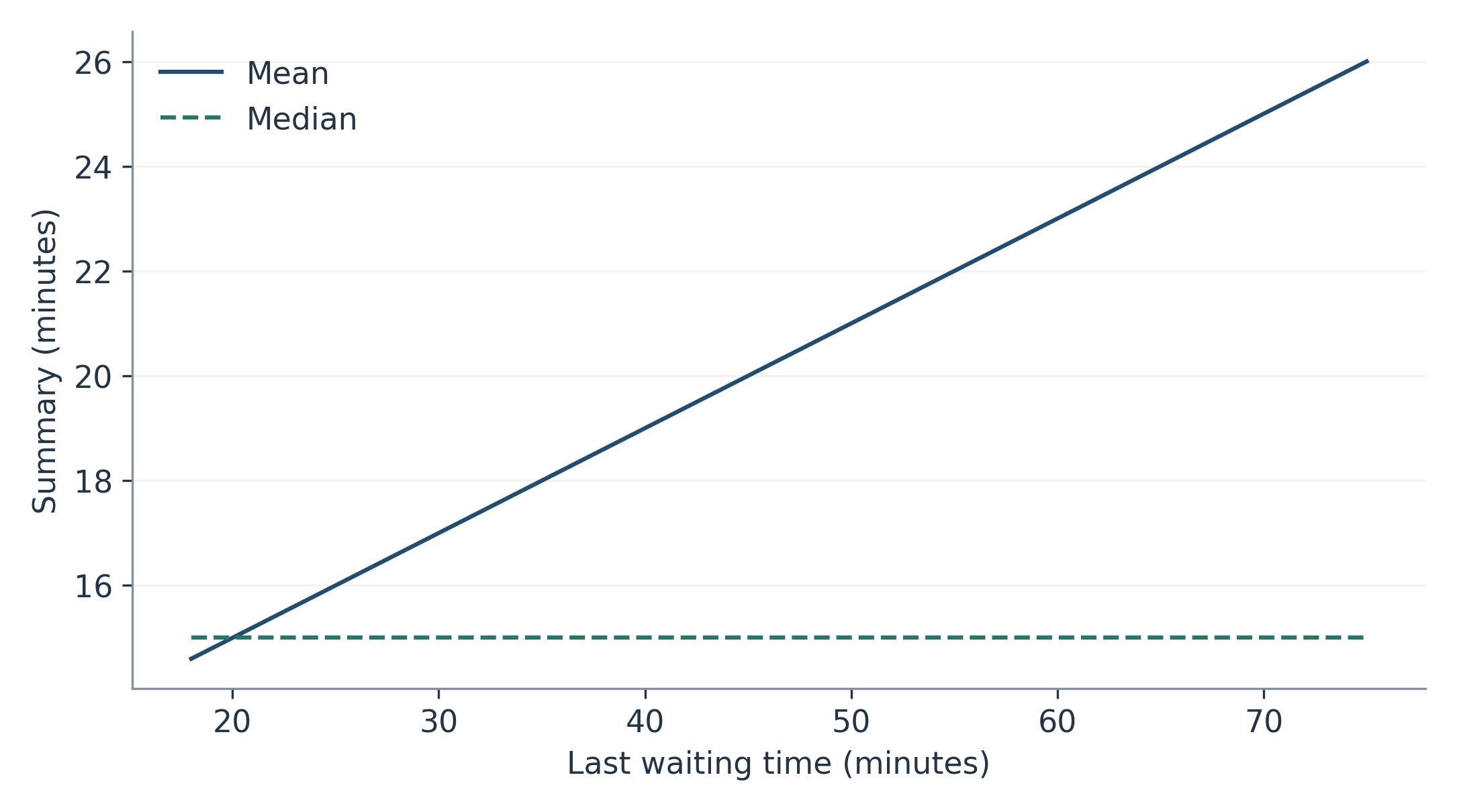
A public lesson should identify the data as synthetic, state the units, and explain why the chosen range matters. Provide a static explanation even when an interactive demonstration is available, so that readers who cannot operate the interaction still receive the mathematical argument.
10.15 Accessibility, maintenance and release testing
A site that renders successfully may still be difficult to use. Check heading hierarchy, keyboard navigation, focus visibility, contrast, descriptive link text, and meaningful image alternatives. A mathematical plot should have a caption identifying the relationship and an alternative description conveying its main conclusion. A long numerical table should remain usable on a narrow screen; horizontal scrolling may be preferable to shrinking text until it is illegible. Avoid conveying publication status through color alone: include explicit words such as Published and In development.
A release test should distinguish source validation from output validation. Source validation can identify a missing QMD file or invalid catalog record before rendering. Output validation inspects generated HTML, images, scripts and styles. A browser test verifies behavior that neither source inspection nor an HTML parser can establish, including menu interaction, search, and keyboard focus. Finally, a deployed-site test checks the actual public hostname and path. A successful local preview does not guarantee successful deployment under a subdirectory.
For a small team, assign an owner to each content collection and document a review cadence. A broken link report should identify the page, link destination, date observed, and corrective action. A changed textbook edition should be recorded in a release note rather than silently replacing a previously cited version. Preserve old editions when feasible, and identify the current edition clearly. Do not include private drafts, grades, API credentials or restricted datasets in a public source repository or generated output. If a secret has already been exposed, revoke or rotate it; merely deleting the visible file is insufficient.
10.15.1 Extended laboratory: A portable publishing hub
Open examples/ch10/publishing-hub/ independently of the textbook project. Run python build_catalog.py to generate the catalog and python check_site.py to verify its local source targets. Then run quarto render and inspect the generated _site directory. The included books are local sample landing pages, not complete books or deployed titles. The exercise intentionally avoids live hosting credentials.
Change the status of the draft title to published without providing a target. Predict the result and run the generator. Restore the original catalog, then create a duplicate slug and repeat the test. Finally, add a new local landing page, update the catalog, and verify that the new title appears without editing the generated page by hand. Record the validation errors and corrective actions. After rendering, test navigation, narrow-screen layout, keyboard access and the computational lesson. If a renderer is unavailable, record that limitation rather than claiming a successful build.
10.16 Additional review and applied project
- Explain why a reader journey is a better acceptance test than a screenshot.
- Resolve
figures/a.pngand/figures/a.pngfrom/books/book-1/ch1.html. - Explain why
/book-1and/book-1/can behave differently. - Give two reasons to maintain independent book projects.
- Explain why a draft catalog entry should not contain an invented URL.
- Derive the mean when the final waiting time is 60 minutes and identify the median.
- Find the value of the last observation for which the mean equals 20 minutes.
- Distinguish build-time computation from browser computation.
- Explain why a static source check cannot establish keyboard accessibility.
- Describe a response to accidental publication of an API credential.
Extended project (30 points). Develop a portable academic publishing hub with a structured catalog of at least three titles, two sample landing pages, a teaching lesson, and a research overview. Include a reader-journey matrix, a URL portability explanation, a generated catalog, deliberate validation failures, and a release audit. Use fictional titles or accurately labeled works in development. Allocate six points each to architecture, catalog integrity, computational lesson, accessibility and release evidence, and reproducibility. A local prototype is sufficient; public deployment is not required.
10.17 Chapter summary
A professional academic website begins with reader needs and a clear information architecture. Quarto transforms source documents into a navigable static website, supports computational lessons, and separates content from presentation. Navigation, accessibility, privacy, and clean builds are essential to a maintainable publication. The same website tools also support HTML books, although book-specific settings belong under the book configuration key.
10.18 Review exercises
- Explain the distinction between a website source and its output directory.
- Why should generated HTML not be the main editing location?
- Distinguish a navbar, sidebar and table of contents.
- Propose five pages for a research portfolio.
- Explain why relative links are useful.
- What happens when a linked source file is renamed?
- Distinguish a stable page from a dated post.
- Explain how a listing reduces maintenance work.
- Calculate the revised waiting-time mean and median.
- Distinguish build-time computation from server-side computation.
- Explain why hidden navigation is not access control.
- Describe two tests for keyboard accessibility.
- Why should both light and dark themes be tested?
- Explain when to set
site-url. - Identify three checks before publishing a site.
- Explain why a textbook catalog can link to independent book projects.
10.19 Applied project: Academic publishing website
Develop a five-page website for a fictional quantitative research and teaching group. Include a home page, research profile with verified references, teaching page with a computational lesson, book catalog with explicit publication statuses, and a research notes listing with two posts. Provide a readable theme, descriptive navigation, and a brief accessibility and privacy audit. Submit source files, rendered output, and a README with build instructions. Use synthetic data only.
| Criterion | Points |
|---|---|
| Information architecture and navigation | 5 |
| Accurate scholarly and instructional content | 5 |
| Reproducible computational lesson | 5 |
| Responsive and accessible presentation | 5 |
| Clean build, documentation and privacy audit | 5 |
| Total | 25 |
10.20 Further reading
10.21 Supplemental assessment
- Conceptual (4 points). Distinguish a website landing page from a book chapter.
- Technical (8 points). Create a website with Home, Research and Teaching pages and relative navigation.
- Applied (8 points). Add a catalog for Book 1 and Book 2, with Book 3 marked draft and excluded from public artifacts.
See the student assessment packet in the source package for submission guidance and any required datasets.
10.22 Looking ahead
Extend website navigation and document structure to a multi-chapter book in Chapter 11.
10.23 Interactive learning lab
Explore the activity below, then explain what changed and why.